

Backend integration
After a customer finished the KreditCheck / DAC widget successfully, the mandators backend will be informed. Two options are available: EMail and a server side callback. Both needs to be configured at the finAPI backend.
EMail
Once an EMail address is configured at the finAPI backend you will receive an EMail. The EMail contains the KreditCheck / DAC PDF and an information about the process. The PDF files are secured by a password which you will get from finAPI support team.
Example
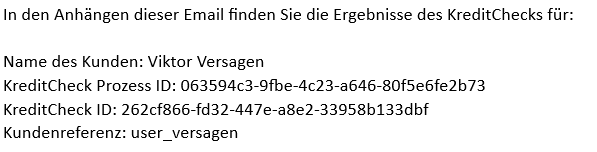
In case you added an clientReference you will see this reference in your EMail.
Server side callback
The callback URL is an server address (within the mandators system), which is called from finAPI backend after a KreditCheck / DAC widget is finished. The POST request contains information about the completed KreditCheck / DAC.
To configure the callback URL for your KreditCheck / DAC widget please contact finAPI support team (support@finapi.io)
Security hint: For the callback finAPI suggest to allow only call from finAPI network. To get the IP range to white label calls from finAPI network please contact our support team (support@finapi.io)
The callback request contains all the data which is needed to download the data.
Request body:
-
Process token (
processToken) → Identifier of the process -
KreditCheck ID (
kreditCheckId) → Identifier of the performed check -
Client identifier (
clientReference) → Client identifier you may use to identify the customer within your system -
Status (
status)
Example:
{
  "processToken": "b474730b-0b0a-4206-9294-XXXXXXXXXXX",
  "kreditCheckId": "71d16b0a-845a-4f8d-aae9-4771d28e98c3",
  "status": "SUCCESSFUL",
  "clientReference": "CU1234567890",
  "errorMessage": "Internal error"
}
Within the callback an user context isn’t available. To access or download the KreditCheck / DAC JSON for an user a token with role manager is needed. To get this use the following API endpoint.
Authenticate with role manager
Use the following API endpoints to authenticate.
|
Environment |
URL (API description) |
|---|---|
|
Sandbox |
|
|
Live |
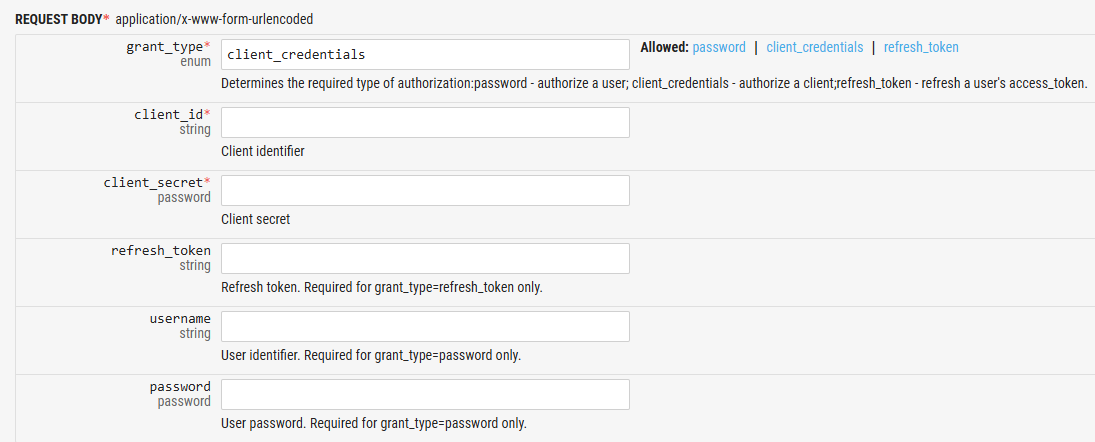
Use the default client id / secret of your mandator you received from finAPI
Login with grant type: client_credentials
Example result
{
  "scope": "all",
  "access_token": "yvMbx_TgwdYE0hgOVb8N4ZOvxOukqfjzYOGRZcJiCjQuRGkVIBfjjV3YG4zKTGiY2aPn2cQTGaQOT8uo5uo7_QOXts1s5UBSVuRHc6a8X30RrGBTyqV9h26SUHcZPNbZ",
  "token_type": "bearer",
  "refresh_token": "0b9KjiBVlZLz7a4HshSAIcFuscStiXT1VzT5mgNYwCQ_dWctTDsaIjedAhD1LpsOFJ7x6K8Emf8M3VOQkwNFR9FHijALYSQw2UeRwAC2MvrOKwfF1dHmOq5VEVYEaGf6",
  "expires_in": 3600
}
Get KreditCheck result as JSON
To download the KreditCheck result the ProcessCtrl. offers an API endpoint. To access this endpoint you need to send the access_token (you received with authentication) as http header parameter 'Authorization'.
Example
Authorization: Bearer yvMbx_TgwdYE0hgOVb8N4ZOvxOukqfjzYOGRZcJiCjQuRGkVIBfjjV3YG4zKTGiY2aPn2cQTGaQOT8uo5uo7_QOXts1s5UBSVuRHc6a8X30RrGBTyqV9h26SUHcZPNbZ
|
Environment |
URL (API description) |
|---|---|
|
Sandbox |
https://docs.finapi.io/?product=solutions#get-/checks/-processToken-/kreditcheck/-kreditCheckId- |
|
Live |
https://docs.finapi.io/?product=solutions#get-/checks/-processToken-/kreditcheck/-kreditCheckId- |
As required path parameters you need the requested processToken and the kreditCheckId you received within the callback.
API: GET /checks/{processToken}/kreditcheck/{kreditCheckId}
Example
{
  "status": "SUCCESSFUL",
  "rateAmount": 1000,
  "rateInsteadRent": true,
  "clientReference": "CU12345678",
  "overallVerdict": "YELLOW",
  "bankConnections": [
    {
      "bankConnectionId": "2456632",
      "accounts": [
        {
          "accountId": "2731723",
          "caseId": "41cb6a83-b547-4627-9a6c-be410d8cad8a",
          "resultAccount": "YELLOW",
If you have a licence for the DAC widget only, the JSON result will be quite empty. You will only see the account data.
To access this API endpoint your mandator needs to be configured to have the scope: data_intelligence:manager. In case of this doesn’t work, please contact our support team (support@finapi.io)
Get DAC result as JSON
If you are interested in the underlying DAC report (JSON) you need to call an additional endpoint. The DAC report is generated per imported account. To download the DAC report you need the caseId of the account you to download. The caseId you can find per account within the KreditCheck JSON (see the example above)
With the caseId you are able to download the DAC report. The needed endpoint is part of finAPI report service
|
Environment |
URL (API description) |
|---|---|
|
Sandbox |
https://di-sandbox.finapi.io/api-docs/index.html#get-/cases/-caseId-/reports |
|
Live |
https://di-live.finapi.io/api-docs/index.html#get-/cases/-caseId-/reports |
For this call you also need the access token as http header parameter 'Authorization'.
API: GET /cases/{caseId}/reports
Example
{
  "caseId":"a5d18c0a-2a6b-4c0b-4567-7dfb4ee3bde0",
  "reports":
  {
    "chargebacks":
    {
      "id":"4e756cd7-6b0f-4d9a-9475-abae61bc646c",
      "creationDate":"2025-04-08 16:26:35.688",
      "caseId":"a5d18c0a-2a6b-4c0b-8f17-7dfb4ee3bde0",
      "type":"CHARGEBACKS",
      "countIncomeTransactions":0,
      "countSpendingTransactions":0,
      "totalIncome":0,