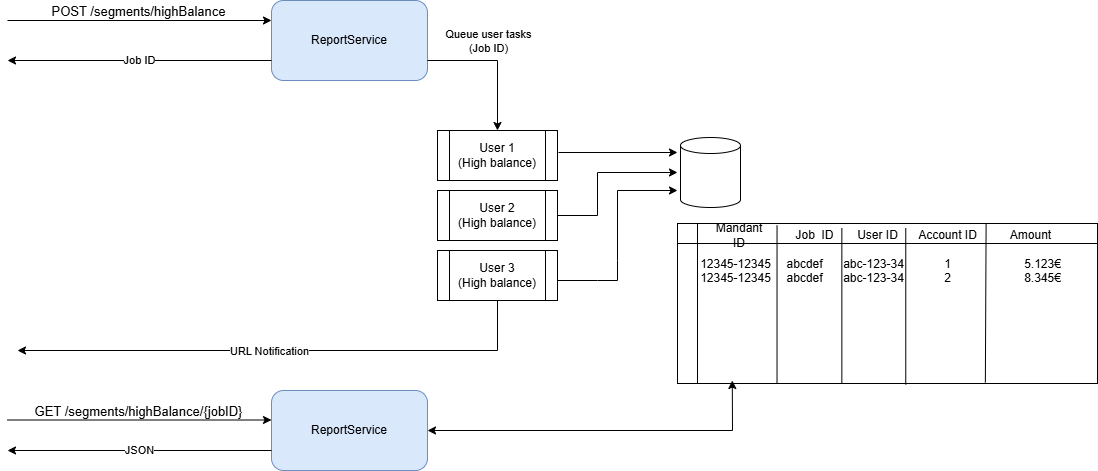

Perfrom user segmentation based on changes in bank account data for all users per mandator.
This report is appropriate for B2B and B2C use cases.
What it solves
Financial Segments enable you to group and analyze users based on their financial behavior from account data.
Instead of manually evaluating raw transaction or balance data, you can create predefined segments to quickly identify relevant user groups, such as customers with high balances, recurring overdrafts, or specific spending patterns.
The feature is designed for use cases like:
-
Customer analytics and reporting
-
Targeted marketing and personalization
-
Risk and liquidity assessment
-
Product recommendations based on financial behavior
Segments are created asynchronously and automatically expire after 14 days.
Financial Segments
Financial Segments provide predefined analyses based on account balances, transactions, and categorized income or spending. Each segment focuses on a specific financial aspect:
-
High Balance
Identifies users whose account balance exceeds a predefined threshold for a specific account type at the moment of reoprt creation. -
Low Balance
Identifies users whose account balance falls below a predefined threshold at least once per month over a specified number of past complete months. This helps detect recurring overdraft or liquidity issues. -
Income / Spending Summary
Provides the number of incoming and outgoing transactions within a defined time range. -
Insurance Spending
Identifies users with insurance-related expenses, including details such as provider, insurance type, amount, and payment frequency. -
Financial Breakdown
Aggregates transaction data for specific label groups, e.g. SALARY, INVESTMENTS, over a defined period (up to 12 months).
Provides statistical metrics such as total, average, minimum, maximum, median, standard deviation, and monthly breakdowns based on complete months.
Process Overview
-
Create a segment job
APOSTrequest starts the calculation of a segment.
The response returns ajobId.Example:
POST /segments/{segmentType}Response:
{ "jobId": "2342342-c345354-345a343" } -
Retrieve results
Use thejobIdto fetch the result once processing is complete.GET /segments/{segmentType}/{jobId}-
404→ Job not ready yet -
400→ Job not found -
200→ Segment result available
-
-
Example result structure
Results are paginated and include metadata such as:-
creation date
-
list of users with related account data
Example:
{ "durationInMonth": 6, "creationDate": "2026-03-25", "users": [ { "userId": "...", "accounts": [ { "accountId": "...", "amount": 1426.84 } ] } ], "totalElements": 1, "totalPages": 1 } -
All endpoints require the corresponding scope and are billed per segment type.
Process flow