

FAQs on Verification of Payee and Instant Payment Regulation
-
What is “Verification of Payee”(VoP)?
Verification of Payee arose as a requirement from the EU regulation on Instant Payments (IPR). The IPR mandates payee verification prior to executing any payments from payment accounts, aimed at enhancing fraud prevention and increasing trust in real-time transfers. It is, however, applicable to all SEPA payments, not just instant payments.
-
Does Verification of Payee only apply to instant payments?
No, the Verification of Payee (VoP) requirements apply to all SEPA credit transfers, not just instant payments.
-
What does Verification of Payee mean for Open Banking payments?
The IP Regulation mandates that verification of payee must take place regardless of the payment initiation channel used by the consumer. This means that Open Banking payments must comply with the verification of payee requirements.
-
Who is responsible for performing the Verification of Payee?
Verifying the validity of the payee data and presenting it to the consumer is primarily the responsibility of the payer’s PSP (Payment Service Provider, i.e, Bank).
For Open Banking payments, the initiating PISP (Payment Initiation Service Provider) will be responsible for performing a VoP and informing the consumer of its result, according to the EU Commission clarification in their Q&A on the interpretation of IPR.
-
What is the deadline for these regulatory changes to take effect?
The Regulation takes effect on October 9th, after which Verification of Payees (VoP) becomes mandatory, meaning payees must be verified for each transaction.
I'm an unlicensed customer using finAPI's webform.
-
What changes in the finAPI products in response to the Verification of Payee requirements?
finAPI will introduce a new flag called verifyPayees, which can be set for each transaction individually, when creating a payment with the create a money transfer endpoint.
The verifyPayees flag will be available on Sandbox and on Production with the release on October 1st, 2025. Initially, the flag will be set to false as a default, and can be set to true for testing.
-
What is the verifyPayees flag, and why is it important?
It is a new boolean parameter that can be set to true or false for each individual transaction. This indicates to finAPI whether the payee's identity should be verified. It helps you manage compliance and risk. -
When will the verifyPayees flag be available, and how does it work initially?
It will be introduced on October 1st, 2025, with the system release. By default, it will be set to false, but you can change it to true for testing purposes. Starting on October 9th, 2025, the default will change to true for all transactions, unless the opt-out is invoked. -
Will banks be ready to meet the regulation deadlines?
Most banks are not expected to go live before October 9th, 2025, so valid verification of payee responses from PSPs is unlikely before this date. -
What happens if I do nothing?
If you do nothing, VoP will automatically be performed for all transactions starting October 9th, and you will be compliant with the new regulation without taking additional action. -
Who is allowed to opt-out of VoP?
Only businesses or companies can opt out. Consumers are not allowed to opt out. -
How can I opt out if I am eligible?
You need to sign a contract amendment with finAPI. If you have not already received the amendment, you may contact support@finapi.io to request it. Once signed, the API will accept theverifyPayeesflag to be set to false. -
Can I opt out for individual payments?
BaFin accepts bulk payments even if they contain only a single payment to be eligible for an opt-out. -
What results can I expect, and what do they mean?

-
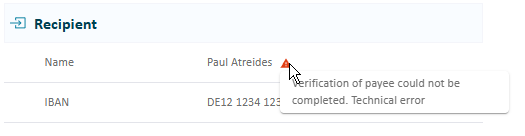
Error: The payee’s bank does not (yet) support VoP checks. The user can still proceed, but must acknowledge the risk before continuing.
-
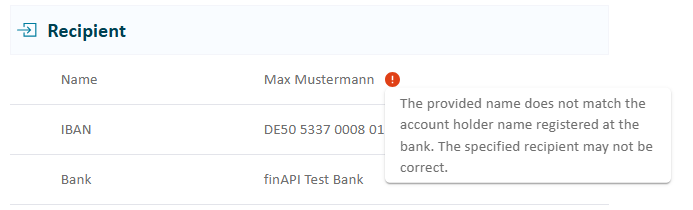
Mismatch: The name given by the payer does not match the name of the payee. The user can still proceed, but must acknowledge the risk before continuing. Hovering or touching (on mobile devices) the red icon shows more details.
-
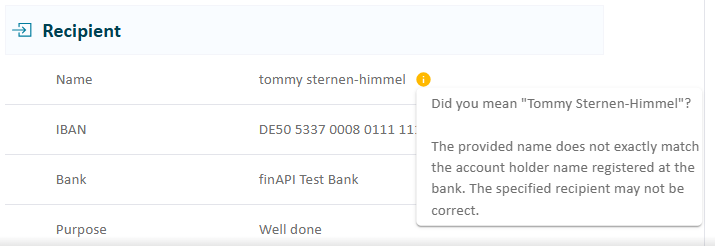
Close match: The name given by the payer does not fully match the name of the payee. The user will see an information icon; hovering or touching (on mobile devices) the icon shows details about the correct recipient. The user can either proceed and acknowledge the risk or cancel the payment and reinitiate with corrected payee details.
-
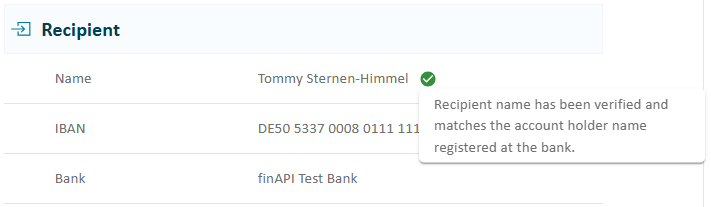
Full match: The name given by the payer matches the name of the payee. The user can proceed with the payment as usual.
-
-
Will payments still be possible, even if the result was a close match, no match, or an error?
The user will be informed that verification was not successful or not possible, but they can still proceed, acknowledging the risks involved. -
Can I change the recipient's details after creating a payment?
No, once a payment is created, it cannot be altered. To change the recipient's name or details, cancel the existing payment and create a new one.
I'm a licensed customer with my own QWAC
-
What if I am a licensed customer, not relying on finAPI’s Webform/license?
If you are operating under a PSD2 license and possess your own QWAC certificate, you are liable for complying with the Verification of Payee requirements.
If you do not have a mechanism in place, finAPI offers a fully compliant solution, relying on the EPC VoP Scheme. #provide link to EPC. More details on it here https://documentation.finapi.io/vopservice
Alternatively, a licensed customer may still choose to rely on finAPI’s license and webform and automatically become VoP compliant.
I'm a finAPI end user
-
Will I see the VoP feedback for every payment?
Every payment initiated by a consumer (not on behalf of a business) is, in principle, subject to the VoP check. There are cases where this check is not mandatory, and the payment will go through without displaying a VoP result.
For example, when the payment is in fact “payee-initiated” (by a merchant) or when the business executing the payment has decided to opt out of VoP. If you are a business user and in your application, there is no way of opting out of VoP, you may contact the relevant support team.
-
What does it mean if the recipient match result is full, close, or no match?
-
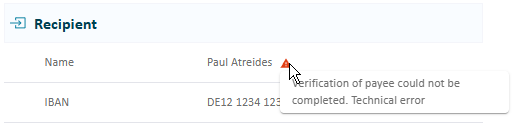
Error: The bank of the payment recipient does not (yet) support VoP checks. You can still proceed, but must acknowledge the risk before continuing.
-
Mismatch: The name of the payment recipient provided by you does not match the name of the actual account holder belonging to the provided IBAN. You can still proceed, but must acknowledge the risk before continuing. Hovering over or touching (on mobile devices) the red icon shows more details.
-
Close match: The name of the payment recipient provided by you does not fully match the name of the actual account holder belonging to the provided IBAN. You can hover over or touch (on mobile devices) the icon to see details about the correct recipient.
You can either proceed and acknowledge the risk or cancel the payment and reinitiate with corrected recipient details.
-
Full match: The name of the payment recipient provided by you fully matches the name of the actual account holder belonging to the provided IBAN. You can proceed with the payment as usual.
-
-
Is a payment still possible, even if the result was no match or an error?
You will be informed that verification was not successful or not possible, but you can still proceed, acknowledging the risks involved. -
Can I change the recipient's details after creating a payment?
No, once a payment is created, it cannot be altered. To change the recipient's name or details, cancel the existing payment and create a new one.