

Learn more about Events and Triggers, which enables you to detect financial events of your customers.
What it solves
To inform customers about relevant changes based on on the end-users account data in a timely manner. These changes include financial events such specific, usual or unusual transactions, low account balances, as well as behavioral or pattern-based events that indicate changes in customer activity.
With the Events and Triggers Service, such events can be automatically identified and provided in a structured format. The reports deliver a consolidated overview of detected events, including their type, trigger, and time of occurrence per user. This information can be used to proactively notify customers, automate downstream processes, or enable further analysis and actions.
Process Overview
Once you have registered for an event, finAPI will notify you of any changes to the monitored data. The event defines which change or occurrence triggers a notification. For example, the event “SALARY_DETECTED” is triggered as soon as a salary payment is detected on an account.
The data is monitored during every manual and automatic update (batch update) of a bank account. Notifications are generated and sent at fixed/configured times for each client. The notification is sent to the client as soon as the defined event (e.g., new salary) has occurred for at least one account. In this case, the URL configured by the client is notified. The notification contains a unique ID that the client can use to retrieve information about the event. An event must be configured once per client.
Prerequirement: Authentication as a manager is required for all API endpoints. To do this, log in to the client role with your client ID/client secret for the default client. Use the access token as bearer token within all API calls.
Our mandator needs to have the configured scope:
-
event_service:manager: To register events and access the results -
event_service:user: To automatically synchronize the data with the event service (see ‘Notification flow’)
|
Environment |
URL |
|---|---|
|
Sandbox |
|
|
Live |
Register events (one time)
To be notified about events, they must be registered once. All available events see at the list below: Introduction to Events & Triggers | Events and Triggers
|
Description |
HTTP Method |
System |
Endpoint |
Link to documentation |
|---|---|---|---|---|
|
Get Token (Login as client) |
POST |
finAPI Access |
|
|
|
Register Event |
POST |
finAPI Event Service |
|
Use the client id and client secrect from your default client and authenticate as client.
Use the access token for further calls as bearer token within the http-header
To register a new event the request must contain the event definition, including:
-
triggerEvent– The type of event that should trigger a notification -
callbackUrl– The URL that will receive the event notification -
options(optional) – Additional configuration parameters
Example:
{
  "triggerEvent": "SALARY_DETECTED",
  "callbackUrl": "https://domain.tld/api/events/callbacks/myevent",
  "options": [
    {
      "key": "AMOUNT_PERCENTAGE",
      "value": "20"
    }
  ]
}
The callback URL should ideally be unique for each event configuration. Once the event is successfully created, the response contains the stored event definition and the generated eventId. Use this id to access the result of triggered events.
{
    "triggerEvent": "SALARY_DETECTED",
    "callbackUrl": "https://domain.tld/api/events/callbacks/myevent",
    "eventId": "835e164c-28ca-4bbb-b4ec-a8f38f3448eb"
}
Data update flow
Once an event is registered and the requried socpe (event_service:user) is configured for your mandator the event service will observe your data. Observation can take place in two different ways.
Manual account update
A manual update is performed using finAPI Access update or import bankconnection. After this update, the data must be synchronized with DI. To do this, the endpoint POST /dataSources/bankConnections/synchronization from the finAPI report service must be used. Synchronization must always be called up via the finAPI WebForm after the update.
|
Description |
HTTP Method |
System |
Endpoint |
Link to documentation |
|---|---|---|---|---|
|
Synchronize data from finAPI Access to finAPI DI |
POST |
finAPI Report Service |
|
The response of the synchronization contains all bank connections which were in update and their state. Please check the bank status or the callback if the update is finished.
Example result:
{
    "user": "d0b049b3-02c1-40a4-b764-097b09867b73",
    "bankConnections": [
        {
            "dataSourceId": "c6fe5a09-95e7-439c-90f6-af54904a5f40",
            "creationDate": "2026-02-25 11:25:24.707",
            "lastUpdate": "2026-02-26 16:24:58.982",
            "externalId": "81306",
            "bankName": "finAPI Demobank",
            "bankStatus": "IN_PROGRESS",
            "updateRequired": false,
            "consentExpiresAt": 1787522399,
            "accounts": [
                {
                    "accountId": "6402706d-96da-4958-b44b-c49602e92bee",
                    "creationDate": "2026-02-25 11:25:24.716",
                    ...
                }
            ]
        }
    ]
}
Note: The response also contains the id of the underlying user (user). The user id should be stored with the current user's data in the customer's system so that the event data can be assigned to a user later.
Automatically (batch) update
The automatic update (batch update) must be configured by finAPI. Once the batch update has been activated, the data is automatically updated at a fixed time. The update only works for accounts where consent for access is valid.
Note: Automatic updates only work for users who have manually synchronized their account data once.
How to get the event results
Notification flow
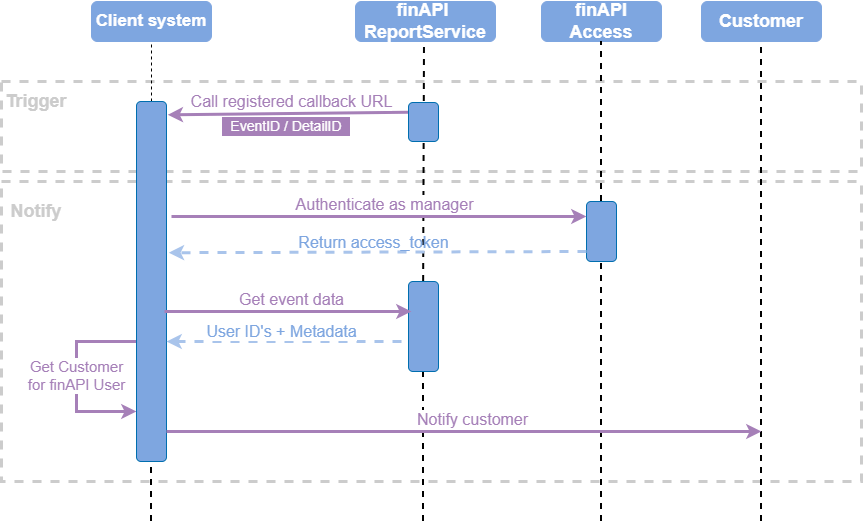
When the configured triggerEvent occurs, finAPI calls your callbackUrl. This contains:
-
eventId(which subscription triggered) -
detailsId(the key you use to fetch the details/result set) -
triggerEvent(event type)
Example:
{
  "eventId": "19c9423c-e410-4000-874c-4045d4e0f301",
  "detailsId": "19c9423c-e410-4000-8f60-b22327e68801",
  "triggerEvent": "SALARY_DETECTED"
}
If the callback is accepted, your system must respond with HTTP 204.
Retrieving Event Details
After receiving the callback, the event details can be retrieved. To retrieve the event details you need to authenticated as manager
|
Description |
HTTP Method |
System |
Endpoint |
Link to documentation |
|---|---|---|---|---|
|
Get token (Login as client) |
POST |
finAPI Access |
|
|
|
Get event data |
GET |
finAPI Event Service |
|
Use the client id and client secrect from your default client and authenticate as client.
Use the access token for further calls as bearer token within the http-header
The result of the endpoint is all users for whom the corresponding event has occurred:
Example:
{
    "users": [
        {
            "user": "d0b049b3-02c1-40a4-b764-097b09867b73",
            "events": [
                {
                    "id": "b8d27962-1855-468b-9e29-c6ffb0e8f585",
                    "type": "SALARY_DETECTED",
                    "details": [
                        {
                            "key": "AMOUNT",
                            "value": "5000.00"
                        },
                        {
                            "key": "COUNTERPART_NAME",
                            "value": "Super Arbeitgeber"
                        }
                    ]
                }
            ]
        }
    ],
    "page": {
        "number": 0,
        "size": 25,
        "numberOfElements": 1,
        "totalPages": 1,
        "totalElements": 1
    }
}
With the id of the user you find the user within your system. Depending on the event type more than one event can occur per user. E.g. for SALARY_DETECTED every new salary on an account is depicted as one independent event. The id represents the account in this case.
Available Events
Events and Trigger is a monitoring and notification service based on predefined financial events and automated triggers.
An event represents a predefined situation within a user’s financial data. When such a situation is detected, a trigger (a notification sent to a predefined URL) informs the finAPI customer that at least one affected user exists. Based on the event details, the customer can then notify or process all impacted users.
Each event is defined by an event key and a notification period:
|
Event key |
Description |
|---|---|
|
Contract & Salary Events |
|
|
CONTRACT_DETECTED |
Indicates that a new (previously unknown) contract has been detected. The event is triggered after the initial contract detection and reports newly identified contracts. |
|
SALARY_DETECTED |
Indicates that a new salary transaction has been detected. Includes the company name and the transaction amount. |
|
Balance Events |
|
|
BALANCES_LOW |
Triggered when an account balance falls below a defined threshold during manual / batch processing. Default threshold: 200€. This is configurable with the option: AMOUNT_VALUE |
|
Bank Connection Events |
|
|
BANK_LOGIN_CONSENT_EXPIRES |
Indicates that the consent for a bank connection will expire within the next 6 days (default value). Includes the name of the bank which will expire. This value is configurable with the option: PUSH_DAYS_BEFORE |
|
BANK_LOGIN_CONSENT_EXPIRED |
Indicates that the consent for a bank connection has been already expired. Includes the name of the bank which is expired. |