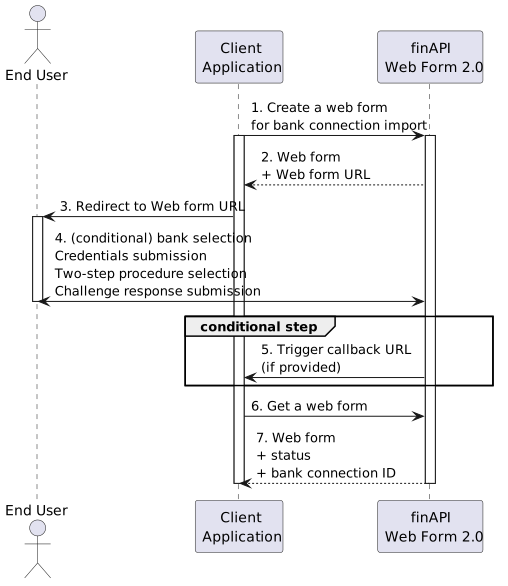

Account Information Services (AIS) web forms let an end user grant access to their bank account data. There are three types:
|
Type |
Purpose |
|---|---|
|
|
Import a new bank connection and its accounts. |
|
|
Refresh data for an existing bank connection. |
|
|
Add a banking interface to an existing connection. |
What the user goes through
-
Create the web form via the API (with the user's Access token) and receive the form URL.
-
Open - the user opens the form (embedded into a page, or by URL/QR).
-
Bank selection - unless the bank is pre-set.
-
Credentials - the user logs in at their bank.
-
SCA - Strong Customer Authentication (see below).
-
Account selection - optional, depending on configuration.
-
Data download and
COMPLETED.
See Callbacks & Redirects for how your backend is notified of the outcome.