

General
Before diving into colors and typography, the most immediate way to make the form feel like yours is to set your logo and favicon. These appear on every screen and establish brand recognition from the first moment.
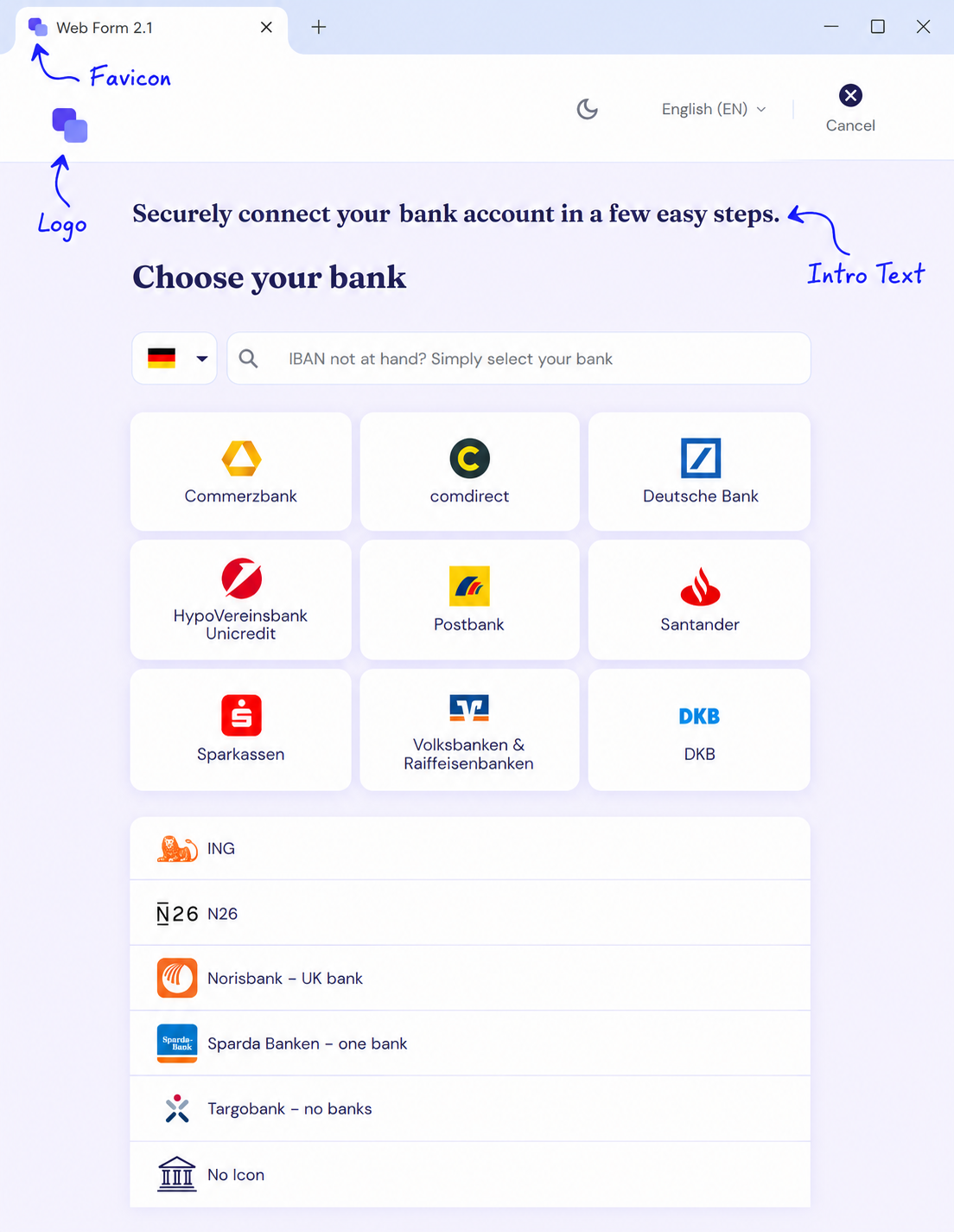
Logo
Your brand mark shown in the form header. Displayed on every screen throughout the flow.
Favicon
The icon shown in the browser tab when the form is open in a standalone window or tab.
Intro Text
A short message shown above the form on the first screen. Useful for setting context or reassuring users about what they are about to do.
Custom Icons
The form uses two functional icons you can replace with your own: the info icon shown next to hints, and the loading animation shown while data is being imported in the background.
Custom icons apply to the 2.0 web form only. The 2.1 web form renders its own icon set and ignores these fields. If you are on 2.1, style the icons through Components instead.
Technical Setup
Branding assets are configured under brand when you create a profile with POST /api/profiles or edit it with PATCH /api/profiles/{id}. All fields are optional — for any field you omit, the finAPI default applies.
Fields
|
Field |
Description |
|---|---|
|
|
Logo shown in the form header. PNG, JPG, GIF or SVG, minimum height 40 px — larger images are accepted and scaled down. Up to 5,000,000 characters. |
|
|
Icon shown in the browser tab. ICO, PNG, JPG, GIF or SVG, minimum 32×32 px. Up to 500,000 characters. Ignored when the form runs embedded in a host page — the host page keeps its own favicon. |
|
|
Message shown above the form on the first screen. Up to 1000 characters, rendered as sanitized HTML. No text is shown when unset. |
|
|
Image used wherever the form renders an info icon, replacing the default one. Up to 5,000,000 characters. Web form 2.0 only. |
|
|
Animation shown while the form imports data in the background, replacing the default loading animation. Usually a GIF. Up to 5,000,000 characters. Web form 2.0 only. |
All images must follow the data URI scheme:
data:[<media type>][;base64],<data>
Example
{
  "brand": {
    "logo": "data:image/png;base64,<base64-encoded image>",
    "favicon": "data:image/png;base64,<base64-encoded image>",
    "introText": "Connect your bank account securely in just a few steps."
  }
}