A profile is the object that customizes a web form. You manage profiles through the /api/profiles endpoints (create, read, update, delete) and apply one by passing its profileId when you create a web form - or by marking a profile as your default, which then applies to every web form you create without an explicit profileId.
What a profile contains
A profile has an id, a label, a default flag, and four customization sections:
|
Section |
Purpose |
Notes |
|---|---|---|
|
|
Logo, favicon, intro text, footer attribution |
See Branding |
|
|
Which elements are shown and how the flow behaves |
|
|
|
Legacy styling (colors, text, base theme enum) |
Deprecated - see Styling with aspect (deprecated) |
|
|
New styling for the 2.1 UI (palette, typography, components, shape, shadows) |
Beta - see Theme (the 2.1 UI look) |
The one decision that matters: aspect vs theme
The styling section you use decides which UI generation your end users see, via its base theme:
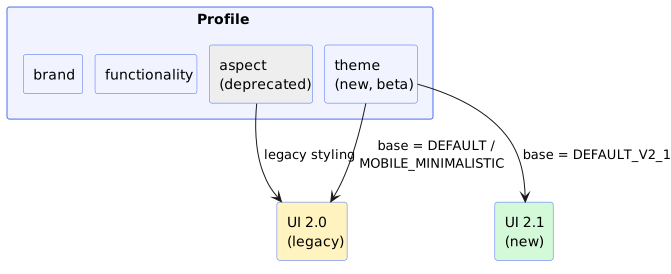
Important: aspect and theme are mutually exclusive within a single profile, and there is no in-place conversion between them. A profile keeps whichever styling section it was created with. To move a profile from aspect to theme, you delete it and create a new one. See [Switching from 2.0 to 2.1].
Beta: both the theme section and the DEFAULT_V2_1 base theme are currently beta. Fields that also work on the UI 2.0 base themes are marked as such on each page; everything else is 2.1-only.
Customization topics
-
Branding -
brand.* -
Functionality & flow -
functionality.* -
Language & translations -
functionality.language+/api/translations -
Theme (the 2.1 UI look) -
theme.* -
Styling with
aspect(deprecated) -aspect.*